Default to id only: FHIR Subscriptions for Implementers Protecting PHI
· 18 min read
Default to id only: FHIR Subscriptions for Implementers Protecting PHI
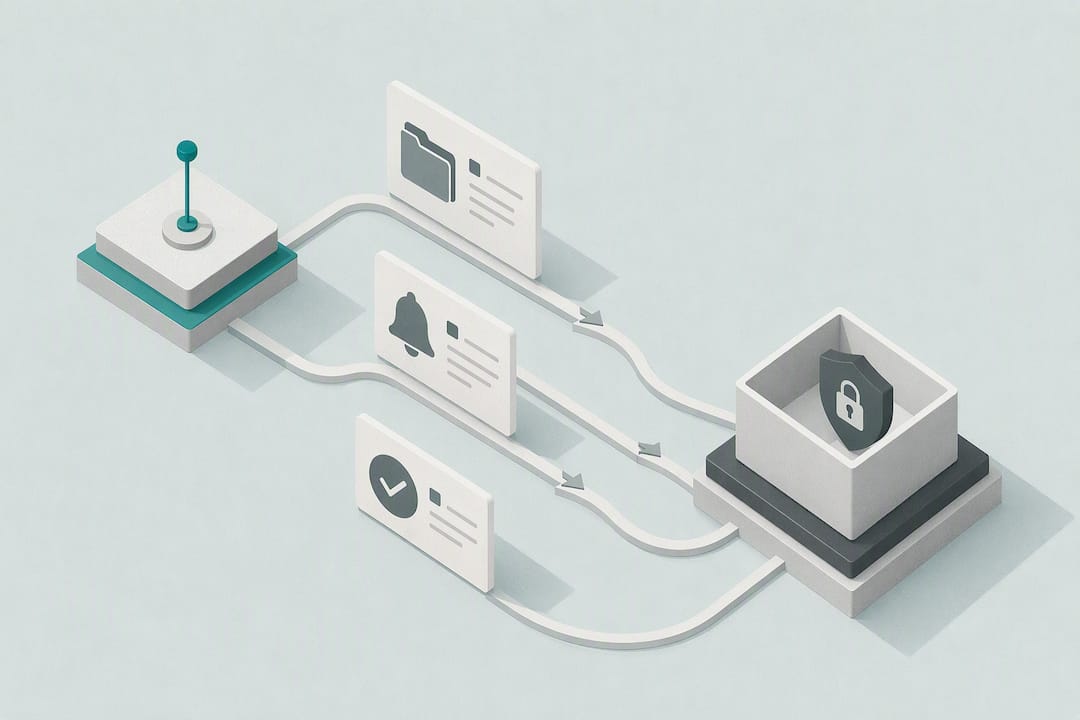
FHIR Subscriptions let a server push event notifications to interested clients by pairing a computable SubscriptionTopic with a Subscription that selects channel, payload, and filters. Use them when you need real-time or near-real-time alerts on new labs, imaging results, or status changes instead of polling, making them ideal for teleradiology workflows that require coverage of every shift. They aren’t guaranteed delivery by default, so plan for missed notifications, retries, and a reconciliation path from day one.
TL;DR:
- Most FHIR servers support only a subset of subscription channels, so verifying capability support via the server’s CapabilityStatement is essential before implementation.
- Use id-only or empty payloads by default to minimize PHI exposure and fetch full resources through secure, audited channels after receiving notifications.
- Regularly check subscription statuses and use the
$statusendpoint to detect silent failures, retries, or dropped notifications caused by network issues or misconfigurations.- When handling high-frequency events, configure
Subscription.maxCountto batch notifications effectively and set heartbeat intervals to promptly identify silent subscription drops.- Always confirm vendor-specific features like in-band versus out-of-band subscriptions, and avoid assuming feature parity across different FHIR server implementations to prevent integration pitfalls.
Table of Contents
- How FHIR Subscriptions Actually Work
- Channels, Payloads, and the Handshake You Can’t Skip
- SubscriptionTopic Filtering and Multi-Resource Streams
- Creating and Monitoring Subscriptions in Production
- Security and Privacy Best Practices
- Running Subscriptions at Scale Without Losing Notifications
- FHIR Subscription Versions: DSTU2, STU3, and R4/R5
- Building and Testing Subscriptions: Concrete Examples
- How MedScrub Handles FHIR Notifications Without Exposing PHI
- Common Pitfalls Worth Avoiding
- Where to Verify the Spec Details
- Sources
- FAQ
How FHIR Subscriptions Actually Work
The Subscriptions framework splits responsibility between two resources that too many new implementers conflate. A SubscriptionTopic is the event definition. It lives on the server, describes what kind of change qualifies as notification-worthy (a new DiagnosticReport, a status change on a ServiceRequest), and gets published once for many clients to use. A Subscription is the client’s specific request against that topic: which channel to use, what payload to send, and which filters to apply. One topic, many subscriptions.
Before you create anything, check the server’s CapabilityStatement. It lists which SubscriptionTopics the server supports, which channels it can deliver on, and what filters are available. Skipping this step is the single most common reason a subscription silently fails to activate. Some cloud-hosted FHIR servers and vendor platforms don’t implement every channel, and community reports on implementation gaps confirm that behavior varies enough between vendors that you should never assume parity with the spec examples.
Once a client submits a Subscription, the server owns the event lifecycle. It watches for resources matching the topic’s trigger criteria, and when a match fires, it packages the event into a subscription-notification Bundle. That Bundle always opens with a SubscriptionStatus resource, which carries the subscription id, the event number, the notification type (handshake, heartbeat, event-notification, or query-status), and any error detail. The rest of the Bundle holds the actual payload, whether that’s nothing, a reference, or a full resource.
In-band versus out-of-band subscriptions
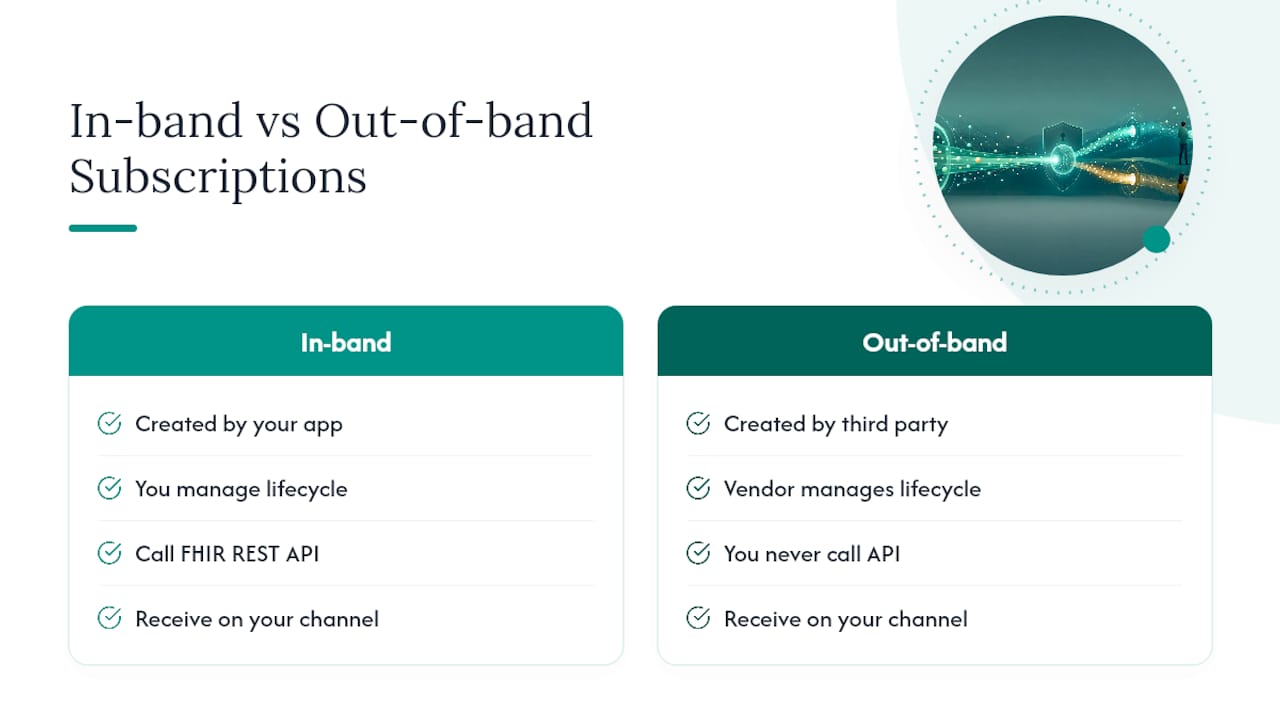
Most implementers picture “in-band” subscriptions: your own application creates the Subscription, receives the notifications, and manages the lifecycle directly against the FHIR server. That’s the pattern this article focuses on because it’s what a developer integrating a new system will build first.
Out-of-band subscriptions work differently. A third party, often a health information exchange or a platform vendor, manages subscription creation on your behalf, sometimes through a proprietary admin console rather than the REST API. You still receive notifications on a channel you control, but you never call POST /Subscription yourself. If you’re integrating with a large EHR vendor’s event system, check whether they expose true in-band FHIR Subscriptions or whether you’re actually subscribing through a vendor-specific portal that happens to use FHIR-shaped payloads. The distinction changes your entire integration and testing strategy.
The mental model that saves the most debugging time: SubscriptionTopic answers “what counts as an event,” Subscription answers “who wants to know and how,” and SubscriptionStatus answers “did it actually happen, and did it work.” Keep those three questions separate in your head and most confusing spec passages resolve on their own.
Channels, Payloads, and the Handshake You Can’t Skip
Four channels cover almost every real deployment, and each one carries a different tradeoff between latency, infrastructure burden, and data exposure.
- rest-hook: the server sends an HTTP POST to a URL you provide. Simplest to implement, most widely supported, and the default choice for most application-to-application integrations.
- websocket: the server pushes notifications over a persistent connection. Better for browser-based or lightweight clients that can’t easily expose a public inbound endpoint.
- message: wraps the notification in a FHIR messaging Bundle for server-to-server routing, common in HIE and interoperability-hub architectures.
- email/sms: sends a plain alert to a human, appropriate for narrow cases like public-health reporting or operational paging, never for clinical payload delivery.
The rest-hook handshake trips up more developers than any other part of the spec. When you create a Subscription with a rest-hook channel, the server sends an initial POST to your endpoint with a SubscriptionStatus of type handshake. Your endpoint has to respond with a success code, typically 200 or 204, before the server marks the subscription active. If your endpoint is behind an auth wall, negotiate the header or token scheme through Subscription.channel.header or server-specific configuration rather than baking credentials into the URL itself. Storing long-lived secrets directly on the Subscription resource is discouraged precisely because that resource can be read by anyone with sufficient access to the subscription list.
Payload choice is where privacy and convenience pull in opposite directions. empty sends nothing but the SubscriptionStatus wrapper, forcing the client to query for details, which is the most privacy-conservative option. id-only includes a reference to the changed resource without its content, letting the client fetch it on demand under its own access controls. full-resource sends the entire resource inline, which saves a round trip but means PHI travels over the notification channel itself, and now that data sits in whatever logs, queues, or intermediate systems handle the delivery.
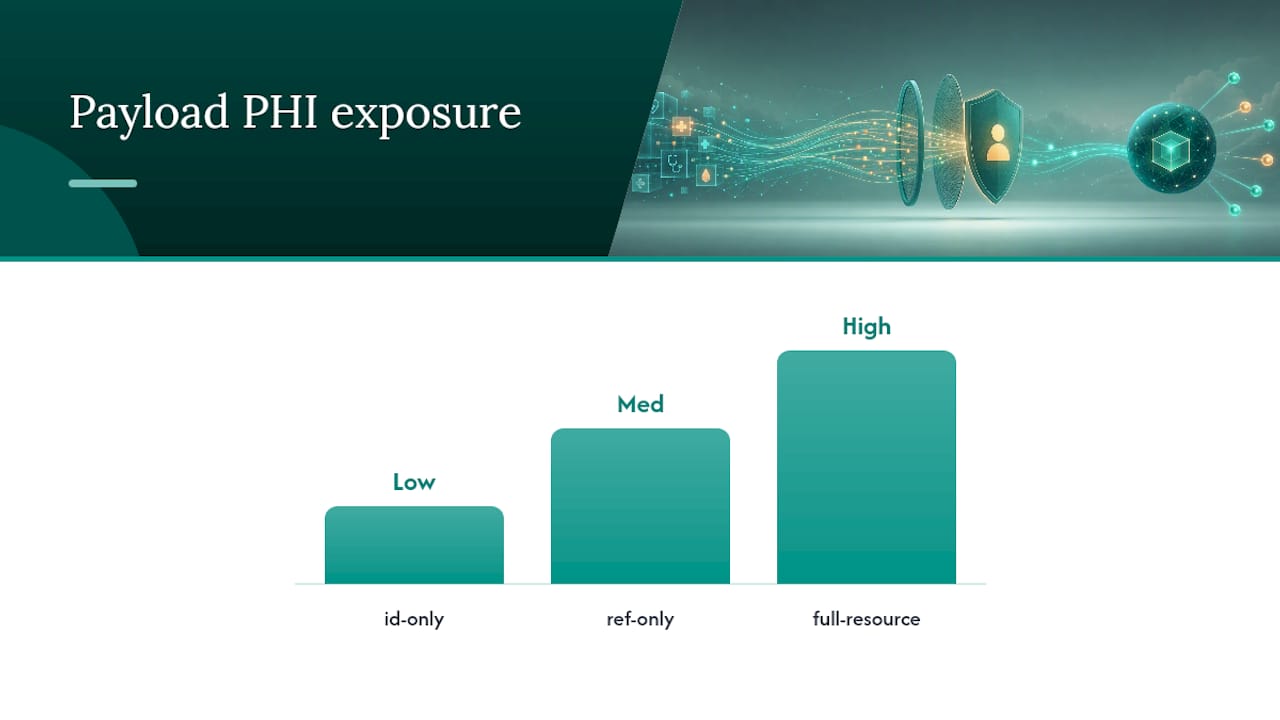
Pro Tip: Default to id-only unless you have a specific latency reason not to. Fetching the resource after notification means your access control and audit logging run through the same path every time, instead of splitting PHI exposure across two different systems with two different security postures.
Batching and heartbeat settings control how chatty the channel gets. Subscription.maxCount caps how many events can be bundled per notification, which matters when a single busy topic fires hundreds of times a minute. Heartbeat notifications, sent at a configured interval even with no events, tell your client the connection is alive and let you detect a dead subscription before a patient’s abnormal lab result silently goes nowhere.
SubscriptionTopic Filtering and Multi-Resource Streams
A single SubscriptionTopic can define triggers across more than one resource type, which is powerful and also the fastest way to flood your consumer with noise if you don’t filter aggressively.
SubscriptionTopic authors declare which filters they support through SubscriptionTopic.canFilterBy, essentially a menu of parameters the topic is willing to let clients narrow on. When you build your Subscription, you populate Subscription.filterBy using only the filters the topic actually advertises. Requesting a filter the topic doesn’t support isn’t a courtesy the server can grant. It’s a request the server should reject or ignore, so always cross-check canFilterBy before writing filter logic.
Common patterns worth building into your integration checklist:
- Filter by
resourceTypewhen a topic spans multiple resources (Observation and DiagnosticReport, for instance) but your consumer only cares about one. - Filter by status or category codes to catch only final lab results rather than every intermediate state change.
- Filter by patient or encounter reference to scope a subscription to a specific care episode instead of an entire population, which also shrinks your PHI exposure footprint.
- Combine filters conservatively at first. A topic with five available filters doesn’t mean you should apply all five; each added filter is another point where a typo silently zeroes out your notification stream.
A practical example: a topic defined around “new critical lab result” might support filtering by code (specific LOINC panels), patient, and priority. A hospital’s sepsis alert system would filter on all three, subscribing only to critical results tied to admitted patients on relevant panels, rather than every lab result the hospital generates in a day. Multi-resource topics are genuinely useful for reducing the number of subscriptions you have to manage, but they only pay off if you take canFilterBy seriously instead of subscribing to the whole firehose and filtering client-side after the fact.
Creating and Monitoring Subscriptions in Production
Creating a subscription is a straightforward REST call, but production reliability depends on what you do after that call succeeds.
- Submit the Subscription. POST a Subscription resource specifying the SubscriptionTopic reference, channel type, payload content, and any filters. A successful create returns a
201, and the response’sLocationheader contains the new resource’s id, which you need for every subsequent lifecycle check. - Watch for the handshake. For rest-hook channels, expect an immediate handshake notification. Respond with a success status promptly, since servers may retry or mark the subscription as error if the handshake fails repeatedly.
- Track lifecycle status. A subscription moves through statuses such as
requested,active,error, andoff. It starts asrequested, and the server flips it toactivewhen ready. If your endpoint stops responding or the topic becomes unavailable, the server may move it to an error status or disable it after persistent failure. - Poll
$statuswhen in doubt. The$statusoperation returns the current SubscriptionStatus for a given subscription, including the last known event number and error detail, which is your first diagnostic stop when notifications stop arriving. - Use
$eventsfor replay, if the server supports it. Where implemented,$eventslets you request past notifications by event number range, which is exactly what you need after a subscription errors out and you have to backfill whatever you missed.
Pro Tip: Never treat an “active” status as a permanent guarantee. Build a scheduled reconciliation job that queries the server for resources changed since your last confirmed event number, independent of whether the subscription channel says it’s healthy. That job is what saves you the day a webhook silently stops firing and nobody notices for six hours.
Developers who build their first subscription integration often assume a resource update or deletion always produces a notification. It doesn’t. Search criteria apply to the resource’s new state, so if a resource is deleted, or edited such that it no longer matches the topic’s trigger, no notification fires at all. If your workflow depends on knowing when something stops matching criteria, you need a separate polling check, because the Subscriptions framework was never designed to notify on absence.
Security and Privacy Best Practices
Treat every subscription notification as PHI in transit, even the ones you think are “just an id.” An id-only payload still confirms that a specific patient had a specific type of event happen at a specific time, which is disclosure enough to matter under most privacy frameworks.
- Default to id-only or empty payloads and fetch the full resource through your normal, audited access path rather than trusting the notification channel with clinical content.
- Re-validate authorization at notification delivery time. An accepted Subscription is not a standing grant. Security has to be checked when the notification actually goes out, not just when the subscription was first approved, because a user’s access rights can change between creation and delivery.
- Enforce TLS on every channel without exception, and whitelist destination endpoints server-side so a compromised or misconfigured client can’t redirect notifications to an arbitrary URL.
- Use short-lived, scoped tokens in channel headers instead of static API keys, and rotate them the same way you rotate any other credential touching PHI.
- For email or SMS channels, route through a secure or direct-messaging pathway where required by your compliance posture rather than standard email, and keep the message content limited to a non-clinical alert (“new result available”) rather than any diagnostic detail.
- For high-sensitivity deployments, consider a dedicated VPN tunnel or a message-queue intermediary instead of an open rest-hook endpoint on the public internet.
A meaningful share of FHIR server deployments still vary in how completely they implement channel authentication out of the box, which is exactly why the Microsoft Q&A thread on Subscription support is worth reading before you assume your target platform handles auth negotiation the way the base spec describes. Verify, don’t assume.
Running Subscriptions at Scale Without Losing Notifications
A subscription that works cleanly in a sandbox with ten test events per day behaves very differently once it’s watching a hospital’s full Observation stream. Scale forces decisions you can defer during a pilot but not in production.
- Tune
Subscription.maxCountto batch events into fewer, larger notifications when a topic fires at high frequency, and pair it with a heartbeat interval short enough that a silent failure gets caught within minutes, not hours. - Decide your retry posture up front. Servers typically retry failed rest-hook deliveries a limited number of times before flipping status to
error, so your endpoint needs to be reliably fast to respond, even if the actual processing happens asynchronously after you return a success code. - Log every delivery attempt, and surface
SubscriptionStatus.errorfields into whatever monitoring dashboard your team already watches. Tying subscription failures to your existing AuditEvent trail turns a mystery outage into a five-minute diagnosis. - Design every notification handler to be idempotent. Because delivery is best-effort rather than guaranteed, you should expect occasional duplicate notifications, and your processing logic needs to handle receiving the same event number twice without corrupting downstream state.
- For genuinely high-volume, mission-critical streams, don’t lean on rest-hook alone. Route through a guaranteed-delivery message queue when the cost of a missed notification is high enough to justify the extra infrastructure.
Pro Tip: Build your reconciliation query before you build your happy-path notification handler, not after. Every team that skips this ships a subscription integration that works perfectly until the first network blip, and then spends a debugging session discovering they have no way to know what they missed.
FHIR Subscription Versions: DSTU2, STU3, and R4/R5
Version history matters more here than in most parts of FHIR because the Subscription resource was substantially redesigned between R4 and R5. DSTU2 and STU3 defined a simpler, single-resource Subscription model with a basic search-criteria string and no separate topic concept. It worked for narrow use cases but didn’t scale to multi-resource events or fine-grained filtering.
R4 kept that simpler model as the stable baseline, and it’s still what many production EHR systems implement today. If you’re integrating against an R4 server, don’t expect SubscriptionTopic or canFilterBy support. Your filtering options are limited to whatever criteria string the server accepts on the Subscription resource itself.
R5 introduced the full Topic-Based Subscriptions Framework described throughout this article: SubscriptionTopic as a standalone resource, filterBy, SubscriptionStatus as a formal resource type, and operations like $status and $events. If a vendor advertises “FHIR Subscriptions,” always confirm which version’s model they actually implement before you design against spec behavior that may not exist on their platform.
Building and Testing Subscriptions: Concrete Examples
Start with the create call. A minimal Subscription resource, POSTed to /Subscription, specifies the topic, channel, and payload type. A successful response returns 201 Created with a Location header like Subscription/1234/_history/1, and that 1234 is the id you’ll use for every status check and eventual deletion.
- Create.
POST [base]/Subscriptionwith the topic reference,channel.typeset torest-hook,channel.endpointpointing at your listener, andcontentset toid-only. - Handle the handshake. Your endpoint receives a POST containing a SubscriptionStatus with
type: handshake. Respond200 OKimmediately. Anything other than a fast success response risks the server marking the subscription as errored before it ever goes active. - Confirm activation. GET the Subscription resource, or call
$status, and confirmstatus: activebefore assuming notifications will flow. - Receive event notifications. Each subsequent POST to your endpoint is a Bundle with a SubscriptionStatus entry (type
event-notification, an incrementing event number) followed by either nothing, a Bundle entry with just a resource reference, or the full resource, depending on your chosen payload type. - Handle errors. If your endpoint returns a non-success code repeatedly, expect the server to eventually POST a SubscriptionStatus with
type: query-statusor move the subscription toerror. Your recovery path should catch that state and trigger the reconciliation query rather than waiting for a human to notice.
For websocket integrations, the pattern is different: your client opens a persistent connection to the server’s designated websocket endpoint, sends the subscription id as part of the connection handshake, and then listens for the same SubscriptionStatus-led Bundles pushed over that open socket instead of an inbound HTTP call. It’s the right choice when your consumer can’t accept inbound connections, common for browser-based dashboards or clients sitting behind restrictive network policies.
A subscription-notification Bundle for an id-only payload typically opens with a SubscriptionStatus resource showing
type: event-notification, aneventsSinceSubscriptionStartcount, and anotification-eventlist of references, each pointing to the changed resource by id rather than including its content. That structural discipline, status first, references second, is what makes automated monitoring of the stream possible at all.
If a delivery fails outright, the server response or subsequent status check typically surfaces an OperationOutcome describing the failure reason, whether that’s an authorization rejection, an endpoint timeout, or a malformed filter. Build your client to parse that OperationOutcome and branch on the error category rather than treating every failure identically.
How MedScrub Handles FHIR Notifications Without Exposing PHI
An on-device consumer built around subscriptions works best when it treats the notification as a pointer, not a payload. Subscribe with id-only content, let the notification simply say “this resource changed,” and fetch the actual resource locally, where de-identification and access control happen on the clinician’s own machine rather than in transit.
That pattern is exactly how MedScrub’s developer integrations are built to consume EMR events: a subscription triggers a local fetch, SubscriptionStatus event numbers let the client reconcile what it’s already processed against what the server says happened, and $events (where a server supports it) fills any gap after a connectivity drop. PHI never has to sit in a notification queue or a webhook log, because the notification itself never carried clinical content in the first place. For most compliance-conscious deployments, that fetch-on-demand pattern beats a push-everything approach, even though push feels faster on paper. Reliability and minimal exposure usually matter more than shaving a few hundred milliseconds off delivery.
Common Pitfalls Worth Avoiding
The mistake I see most often is treating “active” status as a promise instead of a snapshot. It isn’t. Delivery is best-effort, servers can silently start dropping notifications after a network blip, and if you haven’t built a reconciliation query that runs independent of subscription health, you’ll find out about a missed critical result from a clinician instead of your monitoring dashboard.
Roll out incrementally. Whitelist a small set of endpoints, start with the most conservative payload type your workflow allows, and expand scope only after you’ve watched the subscription survive a real outage. And check the CapabilityStatement every single time you integrate with a new server. Assuming feature parity across FHIR servers is the fastest way to spend a debugging afternoon on a problem that a five-minute capability check would have caught.
— Clint
Where to Verify the Spec Details
Treat the Subscription resource page and the Subscriptions Framework overview as your primary references for anything version-specific. For discovery and filtering syntax, check your target server’s CapabilityStatement directly and cross-reference against the SubscriptionTopic documentation for the exact filters that resource supports.
Sources
FAQ
What Are the Three Types of FHIR Subscription Channels?
The three most commonly implemented channels are rest-hook (HTTP POST to a client endpoint), websocket (persistent push connection), and message (FHIR messaging Bundle for server-to-server routing). Email and SMS exist as well but are typically limited to non-clinical alerting rather than payload delivery.
What Does FHIR Stand For?
FHIR stands for Fast Healthcare Interoperability Resources, HL7’s standard for exchanging healthcare data through modular, web-friendly resources like Patient, Observation, and Subscription.
What Are the Disadvantages of FHIR Subscriptions?
Delivery is best-effort by default, not guaranteed, so notifications can be missed during outages, and implementation completeness varies significantly across FHIR server vendors. Full-resource payloads can also expose PHI over the notification channel if payload type isn’t chosen carefully.
Does MyChart Use FHIR Subscriptions?
MyChart is built on Epic’s FHIR APIs, and Epic supports FHIR-based data exchange broadly, but whether a given deployment exposes true topic-based Subscriptions versus a proprietary notification mechanism depends on the specific Epic version and configuration. Always confirm through that server’s own CapabilityStatement rather than assuming spec-complete support.
How Do I Know If a Subscription Is Actually Active?
Check the status field on the Subscription resource directly, or call the $status operation, which returns the current SubscriptionStatus including the last event number and any recorded error. A subscription stuck in requested was never activated, and one that moved to error or off needs investigation before you trust it to deliver anything.


