Developers: 3 Rules for Epic FHIR Integration, TEFCA/IAS and MedScrub
· 13 min read

Developers: 3 Rules for Epic FHIR Integration, TEFCA/IAS and MedScrub
Get Epic sandbox access and an App Orchard client ID first, then implement SMART on FHIR authorization matched to your integration type, validate everything in Vendor Test, and move to per-site production activation. Before you write a line of integration code, hit the /metadata endpoint to confirm supported resources, required scopes, and search parameters. Register for Open Epic sandbox access today and treat the App Orchard review as a parallel track, not an afterthought.
TL;DR:
- Developers should always call the
/metadataendpoint before building queries to confirm supported resources and search parameters for their specific Epic instance.- Sandbox testing requires completing a SMART on FHIR launch, running read-only queries, and deliberately triggering errors to ensure robust handling and understanding of limitations.
- Registration for app access depends on whether it is private or public, with public listings requiring detailed documentation and a formal review process to avoid scope overreach and incomplete error handling.
- Use OAuth 2.0 patterns appropriate to the app type, enforcing TLS 1.2, validating JWT signatures, and treating sensitive client secrets as production credentials from the start.
- Per-site activation is often the slowest step, requiring individual Epic customer approval, data privacy signoff, and provisioned test accounts before deployment to production.
Table of Contents
- Epic FHIR Sandbox: Access, Structure, and Best Practices
- Registering Your App: App Orchard and Client Registration
- Authentication and SMART on FHIR Flows Used With Epic
- Epic FHIR Resources, Capability Statements, and Versioning
- TEFCA, Epic Nexus, and Cross-Organization IAS Workflows
- Data Mapping, Bulk Data, and Performance at Scale
- Vendor Test, Per-Site Activation, and the Production Checklist
- Monitoring, Maintenance, and Handling Change After Go-Live
- MedScrub’s Developer and Deployment Perspective
- Lessons Learned Integrating SMART Apps With Epic
- Where MedScrub Fits in Your Epic Integration Plan
- Sources
Epic FHIR Sandbox: Access, Structure, and Best Practices
Every serious Epic integration starts in the sandbox, and there are two doors into it. Individual developers can self-register through Open Epic for a standard sandbox environment loaded with synthetic patients. Vendors planning a commercial app typically go through App Orchard or Showroom, which provisions a sandbox tied to their eventual production listing. Both paths give you the same core thing: a working Epic FHIR server that behaves like production without touching real patient data.
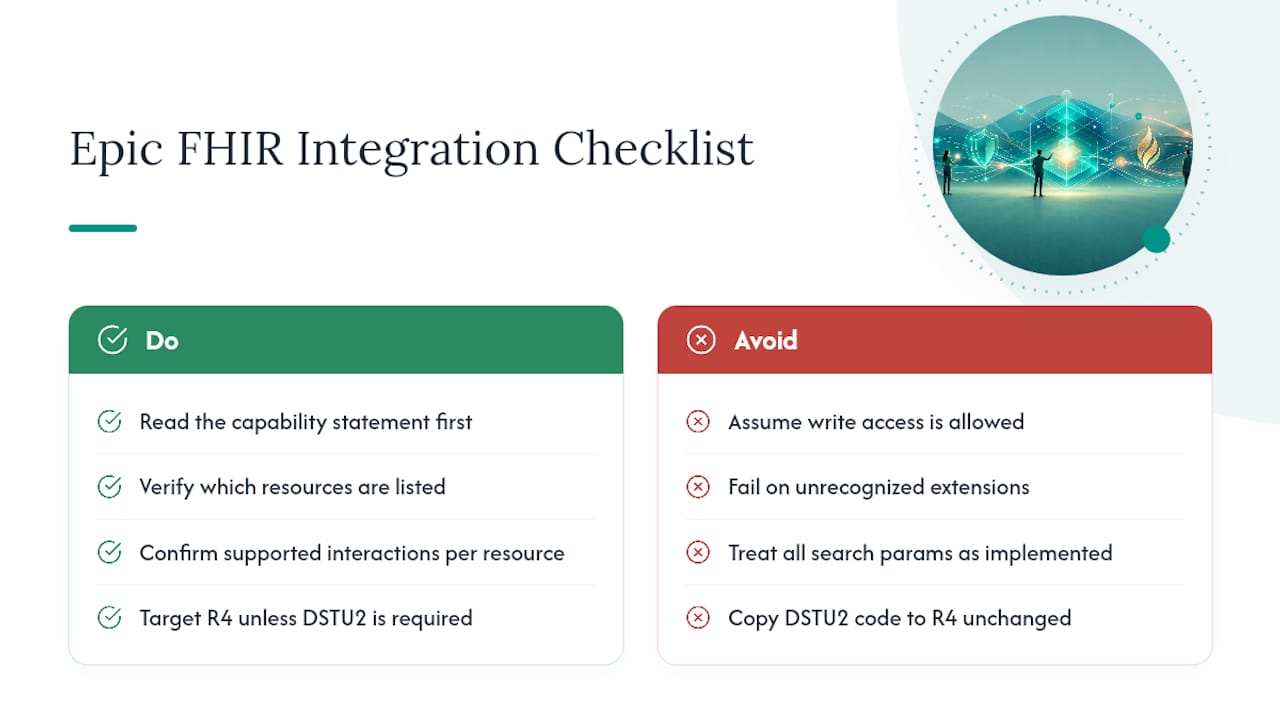
Before writing a single query, call the /metadata endpoint. This capability statement tells you exactly which resources, search parameters, and operations your specific Epic instance supports, and skipping this step is the single most common reason developers waste days building against endpoints that were never available to them.
Once you’re inside the sandbox, run a specific set of tests rather than poking around randomly:
- Complete a full SMART on FHIR launch sequence, both provider-facing and patient-facing if your app supports both.
- Run read-only queries against core resources like Patient, Observation, and MedicationRequest to confirm your parsing logic.
- Deliberately trigger error conditions: expired tokens, malformed search parameters, and unsupported resource requests.
- Test permission boundaries by requesting scopes your registered client shouldn’t have and confirming Epic denies them.
Sandbox data is clean and predictable in a way production data rarely is. Epic’s own technical documentation notes that testing against malformed or edge-case data early surfaces mapping issues that pure API compatibility testing misses. Keep a running log of sandbox limitations, things like missing test patients for rare conditions or simplified organizational hierarchies, so you know which assumptions to revisit later.
Pro Tip: Build your error-handling logic against the sandbox’s deliberately broken test cases before you ever touch production. Epic’s production error responses are often terser than what you’ll see in documentation, and code that only handles the happy path will fail silently on real patient records.
Registering Your App: App Orchard and Client Registration
Your registration path depends entirely on distribution model. A private client ID, one used internally at a single health system or for a narrow point-to-point integration, moves faster and skips public review. A public listing through App Orchard or Showroom, meant to run across multiple Epic customers, requires a formal submission and review cycle.
Before submitting, prepare these artifacts:
- A clear statement of clinical or operational use case, written for a non-technical reviewer.
- The exact FHIR scopes your app requests, with justification for each one.
- A data flow diagram showing where patient data travels and where it’s stored.
- Your security posture: encryption at rest and in transit, session timeout policy, and breach response plan.
- Evidence of successful sandbox testing, including screenshots or logs of your SMART launch flow.
Client IDs move through a defined lifecycle. You start with a non-production client ID for sandbox work, graduate to Vendor Test (VT) once Epic reviews your submission, and only receive a production client ID after VT passes. Even then, production access isn’t universal. Each Epic customer site has to individually activate your app against their instance, which is a separate approval step from Epic’s own review.
Common rejection reasons include:
- Requesting broader scopes than the stated use case justifies.
- Vague or missing data retention and deletion policies.
- Incomplete error handling shown in submitted test evidence.
- Missing detail on how the app handles token refresh and expiration.
Tightening your scope requests to the minimum your app actually needs is the fastest way to cut review cycles down. Reviewers flag overreach almost every time, and it’s an easy problem to avoid.
Authentication and SMART on FHIR Flows Used With Epic
Your integration pattern determines your OAuth 2.0 flow, and picking the wrong one early costs real rework later. SMART on FHIR runs on OAuth 2.0, and Epic supports two primary patterns depending on whether a human is present in the transaction.
For apps launched inside a clinician’s or patient’s session, browser-based apps, EHR-launched apps, patient portal integrations, use Authorization Code with PKCE. This is non-negotiable for public clients that can’t securely store a secret. For backend services, batch jobs, and bulk data pulls with no user present, use client credentials with JWT-based assertions signed by your confidential client’s private key.
If your app touches TEFCA or Epic Nexus IAS workflows, you’ll also need to handle token exchange per RFC 8693, where a subject token from one organization gets exchanged for an access token scoped to another participant’s data.
A few things to lock down in code, not just in documentation:
- Enforce TLS 1.2 or higher on every token and resource call, no exceptions.
- Validate your JWT signing algorithm matches what Epic expects, and rotate signing keys on a schedule.
- Hard-match redirect URIs against your registered values; never accept wildcard matches.
- Treat confidential client secrets and private keys as production credentials from day one, even in sandbox.
Refresh tokens need secure, encrypted storage, never in plaintext logs or client-side storage for public apps.
Waiting for a 401 to trigger a refresh adds latency to every user-facing request that hits the boundary.*
Epic FHIR Resources, Capability Statements, and Versioning
The /metadata capability statement is your source of truth, and reading it correctly means checking three specific things: which resources are listed under rest.resource, which interactions (read, search-type, create) each resource supports, and which search parameters are actually implemented versus just documented generically in the FHIR spec.
Commonly available Epic FHIR resources include Patient, Encounter, Condition, Observation, MedicationRequest, AllergyIntolerance, and DocumentReference. Most of these are read-only from the external API perspective; write access is far more restricted and typically limited to specific use cases like scheduling or patient-generated data, and only after explicit approval.
Epic layers its own extensions on top of base FHIR resources, and these show up as additional fields or nonstandard search parameters your code needs to tolerate gracefully rather than reject. Build your parsers to ignore unrecognized extensions rather than fail on them.
On versioning: Epic designates R4 as its primary REST-based interoperability standard, and new integrations should target R4 exclusively unless a specific legacy system forces DSTU2 compatibility. If you inherit an older DSTU2 integration, budget real time for the migration. Resource structures, search parameter names, and even some data types changed between versions, and a straight copy-paste port will fail silently in places.
Epic itself frames FHIR as one tool among several: read-only structured queries fit R4 well, while real-time event notifications or high-volume transactional workflows sometimes still route through HL7 v2 or proprietary interfaces alongside your FHIR calls.
TEFCA, Epic Nexus, and Cross-Organization IAS Workflows
Cross-organization access under TEFCA follows a specific nominal flow, and understanding it up front saves you from redesigning your token handling mid-project.
- Your app initiates patient discovery, often via XCPD, to confirm the patient exists at another participating organization.
- It resolves the Home Community ID (HCID) for that organization.
- It locates the correct FHIR endpoint for that specific site.
- It performs a subject-token exchange scoped to that individual organization to retrieve authorized data.
Epic Nexus handles client ID distribution differently than a standard single-site registration. One client ID can span many participating organizations, because Epic Nexus propagates your registration to Participants rather than requiring a fresh registration at every site.
Request the community scope when your app needs to pull records a patient has authorized across multiple linked organizations. The token response includes a user_selected_organizations array, and your app must loop through it, performing a separate subject-token exchange for each entry before it can retrieve that organization’s data.
The gotcha most teams miss: designing your token-handling logic for a single organization first, then bolting on multi-organization support later. Epic’s own IAS guidance makes clear that planning for multiple simultaneous subject-token exchanges from the outset avoids a full rewrite when TEFCA support becomes a requirement.
Data Mapping, Bulk Data, and Performance at Scale
Map your fields against USCDI and US Core before you write a single transformation function. These standards define the baseline data classes, demographics, medications, lab results, that any broadly interoperable app needs to support, and starting there keeps your mapping table from becoming Epic-specific spaghetti. Document every optional field and Epic-specific extension separately, since silently dropping unmapped fields is how downstream clinical logic breaks.
For population-level work, cohort analysis, quality reporting, research pulls, don’t paginate through individual patient queries. Epic’s Bulk Data (Flat FHIR) export is built for exactly this, though it comes with real constraints: exports run asynchronously, completion times vary with dataset size, and you need polling logic rather than a synchronous request pattern.
For everyday sync work, chunk your requests and respect Epic’s pagination bundles rather than requesting oversized page sizes that risk timeouts. A few patterns that hold up in production:
- Use
_lastUpdatedsearch parameters for incremental sync instead of re-pulling full patient records on every run. - Cache capability statement results locally rather than calling
/metadataon every startup. - Back off exponentially on rate-limit responses instead of retrying immediately.
Patient identifier reconciliation across multiple Epic organizations is often the most time-consuming operational task in the entire project, more than the API work itself. Build your reconciliation rules and mapping tables early, before you have thousands of records to untangle retroactively.
Pro Tip: Log every field your mapping layer drops silently, even ones you think don’t matter. Six months in, someone will ask why a specific data point never shows up, and “we dropped it in the mapping layer” is a bad answer to give a clinician.
Vendor Test, Per-Site Activation, and the Production Checklist
Vendor Test is where Epic verifies your app behaves correctly before any real patient touches it, and treating VT as a formality rather than a real gate is how production incidents happen.
In VT, validate:
- Every SMART launch sequence your app supports, including edge cases like a session timing out mid-launch.
- Scope enforcement: confirm your app genuinely can’t access data outside its granted scopes, not just that it doesn’t request it.
- Error paths for expired tokens, revoked consent, and malformed responses.
- Behavior when a queried resource simply doesn’t exist for a given patient.
Per-site activation is a separate hurdle from VT, and it’s the step most teams underestimate. Each Epic customer organization has to independently approve your app before it can touch their production data, which means:
- Data privacy signoff from that organization’s compliance team.
- Confirmation of your production API keys and client IDs specific to that site.
- Test accounts provisioned on their instance for a final validation pass.
Before flipping to production, confirm your approved scope list matches exactly what’s live in code, set up monitoring on token failures and error rates, document an incident response plan, and define clear rollback criteria if something breaks post launch.
Timelines vary widely by organization size and app complexity, and Epic’s own guidance acknowledges that per-site approval processes routinely add real time to go-live schedules beyond what the technical build requires. Budget for that reality instead of promising a launch date before you’ve heard back from a single site’s compliance team.
Monitoring, Maintenance, and Handling Change After Go-Live
Production stability depends on watching the right signals, not just uptime. Track latency per endpoint, 4xx and 5xx error rates broken out separately, token exchange failures, and sync drift between your local data and Epic’s source records.
Epic updates its FHIR implementation periodically, and version pinning combined with canary deployments protects you from an unannounced field change breaking your parser in production. Subscribe to Epic’s developer update channels rather than discovering a breaking change through a support ticket.
Build retry logic with exponential backoff for rate-limited or transient failures, and design downstream consumers to degrade gracefully, showing stale-but-labeled data rather than a blank screen when a sync fails.
On governance:
- Schedule periodic security reviews of your token storage and signing key rotation.
- Track per-site reauthorization requirements; some organizations require periodic re-approval, not just initial signoff.
- Set explicit SLA expectations with each site around data freshness and incident response time.
MedScrub’s Developer and Deployment Perspective
MedScrub’s architecture treats PHI de-identification as a local, on-device step before anything touches a broader workflow, which changes how we approach FHIR resource mapping: reversible de-identification lets our developer API work with structured Epic data without PHI ever leaving the clinician’s machine. The eSpiral case study reinforced a pattern we now expect on every rollout: the technical integration moves fast, but per-site data governance signoff sets the real timeline. Teams combining MedScrub with Epic FHIR should expect standard SMART on FHIR auth patterns and a resource surface built around US Core mapping.
Lessons Learned Integrating SMART Apps With Epic
Three things hold true across most Epic integrations: plan your scope requests before you touch code, budget real calendar time for per-site coordination since it rarely tracks your dev timeline, and write automated tests against edge-case data, not just the happy path. Expect the technical build to finish well before every site signs off. Assign one owner for OAuth implementation, one for data mapping, and one specifically for per-site testing coordination, because treating all three as one job is how details get dropped.
— Clint
Where MedScrub Fits in Your Epic Integration Plan
Epic FHIR integration solves the interoperability problem, but it doesn’t solve what clinicians do with all that structured data once it lands. That’s the gap MedScrub was built to close: it syncs directly with Epic and other major EMR systems, then turns the resulting data into chart summaries, lab trend reports, and follow-up reminders automatically, without sending PHI to an external cloud.
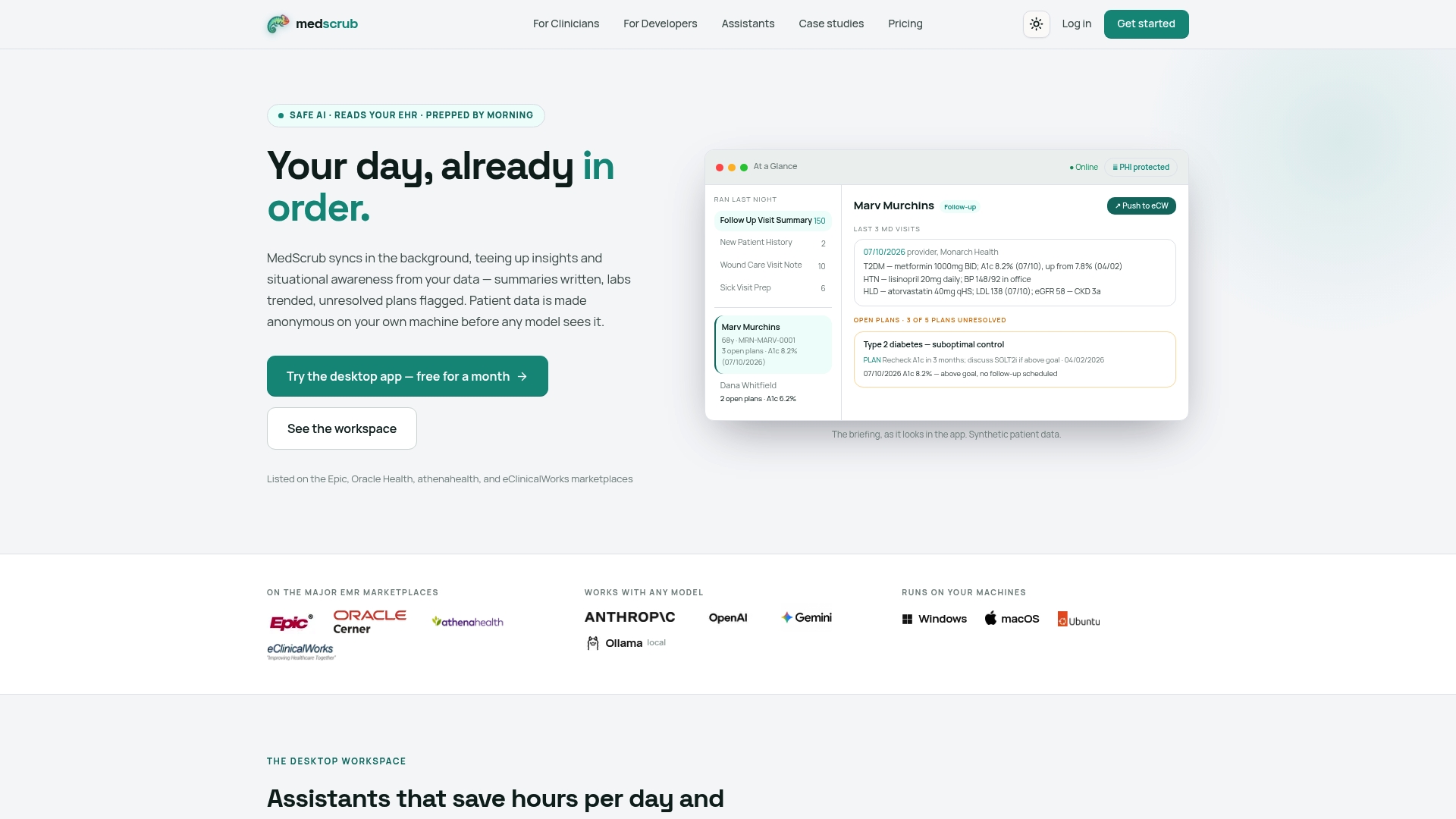
For developers, a self-hosted API with reversibly de-identified FHIR access allows building clinical AI features against real chart data while PHI stays on the clinician’s machine. For clinicians, that same architecture aims to reduce documentation work each day. If you’re a developer, start with the MedScrub developer platform to see the API surface and auth patterns firsthand. If you’re evaluating this for a practice or health system, the clinician product page walks through the workflow directly, and the eSpiral case study shows how one organization handled the per-site coordination this article just walked through. Whichever path fits, follow your organization’s security and per-site approval process before moving any integration into production.
Sources
Keep these bookmarked through your build:


