IT Teams: Right Size On Prem LLMs to Hit Under 50 ms Latency
· 19 min read

IT Teams: Right Size On Prem LLMs to Hit Under 50 ms Latency
On-prem LLM deployment means running a large language model on infrastructure your organization owns or leases exclusively, rather than calling a vendor’s API. Choose it when you need predictable latency under 50 milliseconds, when data residency rules bar sensitive information from leaving your perimeter, or when your query volume is steady and high enough that owned hardware beats per-token cloud pricing. If your traffic is bursty, small, or experimental, stay on a cloud API. If it’s steady, sensitive, or regulated, on-prem usually wins.
TL;DR:
- On-prem deployment offers consistent latency under 50 milliseconds and keeps sensitive data within organizational infrastructure, favoring high-volume and regulated environments.
- Proper architecture involves a gateway, inference engine, retrieval layer, and monitoring, with an emphasis on starting with an OpenAI-compatible endpoint for flexibility across models.
- VRAM needs are straightforward to calculate, with quantization reducing memory demands by up to four times, enabling smaller hardware requirements for large models.
- vLLM is suitable for serving multiple concurrent users efficiently, while NVIDIA’s TensorRT-LLM provides peak performance for latency-critical, high-volume applications.
- Licensing restrictions and workload predictability are key considerations for cost comparison, with on-prem becoming cost-effective primarily for steady, high-volume workloads that meet legal and latency constraints.
Table of Contents
- What Does On-Prem LLM Deployment Actually Look Like?
- How Much VRAM Do You Actually Need?
- Which Inference Runtime Should You Actually Run?
- How Do You Choose a Model and Handle Licensing?
- Why the Gateway Comes Before Everything Else
- What Should Your Day-2 Operations Runbook Cover?
- Is On-Prem Actually Cheaper Than the Cloud API?
- How Do You Stage a Hybrid Deployment Without Disruption?
- How MedScrub Handles PHI On-Device in Practice
- What a Sensible First Pilot Looks Like
- See How Medscrub Fits Your On-Prem Strategy
- Sources
- FAQ
What Does On-Prem LLM Deployment Actually Look Like?
The phrase covers more ground than it implies. On-prem can mean a single workstation with a consumer GPU running a 7B model for a five-person team, or an air-gapped server rack in a co-location facility serving thousands of daily requests across a hospital network. The form factor changes; the architecture underneath rarely does.
A production deployment breaks into four layers. First, the gateway, which handles authentication, authorization, and audit logging before any request touches a model. Second, the serving engine, the inference runtime actually loading weights and generating tokens. Third, an optional retrieval-augmented generation (RAG) layer that pulls relevant documents from a vector database before the model answers. Fourth, monitoring and operations, the telemetry and alerting that tells you when something breaks before a user notices.
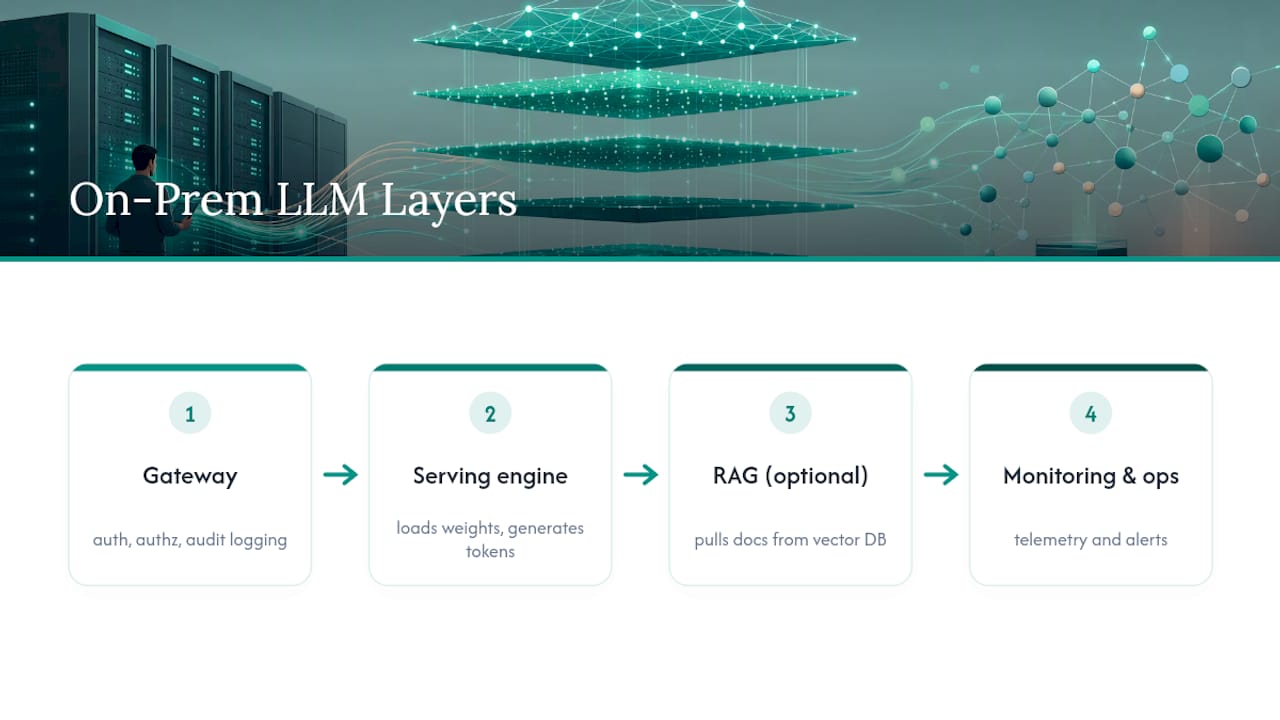
Skip the gateway and you have a demo, not a deployment. Every serious on-prem LLM guide treats the gateway as the first thing you build, not the last thing you bolt on. It’s the layer that turns “we ran a model on a server” into “we have an auditable, compliant system.”
One detail that saves teams months of rework: build your serving layer around an OpenAI-compatible endpoint from day one. Runtimes like vLLM and Ollama both expose this interface, which means your applications talk to /v1/chat/completions regardless of what’s actually running behind it. Swap Llama for Mistral, swap Ollama for vLLM, swap a single GPU for a cluster. Your application code never changes. This decoupling is the single highest-leverage architectural decision in the entire stack, and teams that skip it end up rewriting integration code every time they change models.
Compare that to a cloud API call, where latency swings anywhere from 50 to 500 milliseconds depending on provider load, region, and rate limiting. A properly sized on-prem deployment holds under 50 milliseconds consistently, because you control the queue, the hardware, and the network path end to end.
How Much VRAM Do You Actually Need?
The math is simpler than most vendors make it sound, and getting it wrong is the single most common reason on-prem pilots stall.
Start with the base formula: VRAM required = model weights + KV cache + overhead. Model weights scale directly with parameter count and precision. A 7B parameter model in FP16 needs roughly 14GB just for weights (2 bytes per parameter). The KV cache holds context for active conversations and grows with context length and concurrency, often surprising teams scaling from a single user to many
Industry guidance recommends multiplying your base model size by 1.2 to 1.3, or alternatively reserving a flat 1 to 1.5GB of overhead on top of weights and cache, to account for CUDA context, activation memory, and framework overhead. Skip this buffer and you’ll see out-of-memory crashes under real concurrent load that never showed up in single-user testing.
Quantization is the lever that makes most of this affordable. Dropping from FP16 to 4-bit quantization (via GPTQ, AWQ, or GGUF formats) cuts memory use by roughly 4x. A 70B model that needs 140GB in FP16 drops to around 35 to 40GB in 4-bit, which is the difference between needing four data-center GPUs and needing one. The trade-off is real but often overstated: well-implemented 4-bit quantization (AWQ in particular) preserves most reasoning quality on general tasks, but degrades measurably on tasks requiring precise numerical reasoning or long-context recall. Q5 sits as a reasonable middle ground when you have the headroom.
Here’s how that plays out across common model sizes:
| Model size | FP16 VRAM (approx.) | 4-bit VRAM (approx.) | Typical hardware fit |
|---|---|---|---|
| 8B | 16GB | 5GB | Single consumer GPU |
| 34B | 70GB | 18GB | Single data-center GPU |
| 70B | 140GB | 40GB | Single GPU or dual GPUs |
These figures assume moderate context length and a handful of concurrent sessions; heavier concurrent load pushes KV cache demands up independently of model size, so treat the table as a starting point, not a purchase order.
CPU inference is viable for low-throughput, latency-tolerant use cases, a nightly batch summarization job, an internal tool with a handful of users who don’t mind waiting a few seconds. It is not viable for anything with concurrent users expecting sub-second responses. If your use case involves more than a couple of simultaneous requests, budget for a GPU.
Pro Tip: Size your VRAM for peak concurrent sessions, not average load. A hospital’s chart-summarization tool might average two requests a minute but spike to fifteen during morning rounds. Size for the spike, or your p95 latency will tell on you.
Which Inference Runtime Should You Actually Run?
Three names dominate this conversation, and they solve different problems.
Ollama is the fastest path to a working model. It packages weights, runtime, and a simple API into a single binary, and you can have a model answering queries within minutes of installation. Its sweet spot is proof-of-concept work, single-user tools, and low-concurrency internal apps. Where it falls short is high-concurrency production traffic. Ollama processes requests in a comparatively simple queue model that doesn’t scale gracefully past a handful of simultaneous users.
vLLM is built for exactly that scaling problem. It implements PagedAttention, a memory management technique that treats the KV cache like paged virtual memory instead of allocating one contiguous block per request, plus continuous batching, which lets new requests join a batch mid-generation instead of waiting for the whole batch to finish. Together these are the mechanism that lets one large GPU serve dozens of concurrent users instead of the handful a naive implementation manages. If your deployment needs to serve more than ten or fifteen concurrent users reliably, vLLM is close to a requirement rather than an option.
TensorRT-LLM, NVIDIA’s compiled inference engine, sits at the peak-performance end of the spectrum. It compiles models into optimized kernels specific to your exact GPU architecture, which yields the lowest latency and highest throughput of the three, at the cost of a more involved build process and less flexibility when swapping models. Teams reach for it when they’ve already validated a model choice and need to squeeze out every millisecond, typically in high-volume, latency-critical production settings rather than early pilots.
The operational trade-offs matter as much as the raw throughput numbers:
- Ollama runs as a single binary with minimal orchestration, ideal for a workstation or a small server with no container infrastructure.
- vLLM typically runs in a container (Docker) and benefits from Kubernetes orchestration once you’re running multiple model replicas or need rolling updates.
- TensorRT-LLM requires a build step tied to your specific GPU and CUDA version, making it the least portable but the fastest at runtime.
- All three can expose an OpenAI-compatible endpoint, which is what makes migrating between them relatively painless if your application layer was built correctly.
The recommended migration path echoes what most production teams converge on independently: start with Ollama for the proof of concept, validate that the use case works and users adopt it, then migrate to vLLM once concurrency demands justify the added operational complexity. Reach for TensorRT-LLM only after you’ve locked in a model choice and need the last mile of performance. Jumping straight to Kubernetes-orchestrated vLLM for a two-person pilot is over-engineering; running Ollama in production for two hundred concurrent hospital staff is under-engineering. Match the tool to the traffic you actually have, not the traffic you hope to have in eighteen months.
How Do You Choose a Model and Handle Licensing?
Before you evaluate a single benchmark, check the license. This is the step teams skip and the one that causes the most expensive rework later.
Run through a license-first checklist on any candidate model: Does the license grant commercial use rights, or is it research-only? Are there restrictions on derivative works if you plan to fine-tune? Does the license impose usage caps tied to your organization’s size or revenue (some “open” licenses restrict commercial use above a certain monthly active user threshold)? Are there export control considerations if your organization operates across borders? A model that looks free can carry restrictions that make it legally unusable for a healthcare or financial services deployment, and finding that out after a six-month integration project is a bad way to spend a quarter.
Once licensing clears, match the model family to the job:
- Retrieval and summarization tasks (chart summaries, document Q&A, internal knowledge lookup) tolerate smaller, faster models in the 7B to 13B range, especially when paired with strong RAG grounding.
- Complex reasoning tasks (multi-step clinical decision support, financial analysis) generally need larger models in the 34B to 70B range, where quantization headroom matters more.
- High-volume, latency-critical tasks (real-time chat, live transcription assistance) favor mid-size quantized models tuned for throughput over raw capability.
Once you’ve picked a model and a quantization level, validate it before it touches production data. A short pilot workflow that works well in practice:
- Assemble a test set of 50 to 100 real (de-identified) queries representative of your actual use case, not generic benchmark questions.
- Run the same queries against the full-precision model and the quantized candidate, and log both outputs side by side.
- Score for factual consistency and hallucination rate, with particular attention to numerical or date-based details, which degrade first under aggressive quantization.
- Set a rollback threshold in advance (for example, more than a 5 percent divergence rate on your test set) rather than deciding after you’ve already seen the results.
- If the quantized model fails the threshold, step up one precision level (Q4 to Q5, or Q5 to FP8) rather than assuming quantization itself is the problem.
Skipping step four is the most common mistake. Teams that decide their quality bar after seeing the output tend to talk themselves into accepting worse results than they’d have accepted going in.
Why the Gateway Comes Before Everything Else
Deploy the gateway before you deploy the model, not after. This ordering isn’t a style preference. It’s what makes the difference between a system you can defend in an audit and one you can’t.
The gateway enforces identity and access control through SSO integration (OIDC or SAML), so every request carries a verified user identity rather than an anonymous API key shared across a department. It logs every request and response at a granular level, per user, per session, per query, which is the artifact you’ll need if a regulator or auditor asks what data touched the model and who saw the output. And it enforces retention policy, deciding how long those logs live and under what encryption.
A production-ready gateway layer typically handles:
- Authentication via SSO/OIDC/SAML, tied to your existing identity provider rather than a separate credential system.
- Per-request audit logging that captures user identity, timestamp, input, and output.
- Rate limiting and quota enforcement per user or department.
- Retention policy enforcement, including automatic purge schedules aligned to your compliance requirements.
RAG adds a second governance dimension once you wire it in. The retrieval layer needs permission-filtered search, meaning a user’s query against your vector database only returns documents that user is authorized to see, not everything in the index. Pair a vector database such as Qdrant, pgvector, or Milvus with a local embedding pipeline (so embeddings themselves never leave your environment) and you get grounded, current answers without shipping proprietary or sensitive documents to a third-party embedding API.
For organizations running fully air-gapped, no-egress environments, model and software updates require a different workflow entirely: signed update bundles, verified offline before installation, with export controls and local telemetry replacing the always-connected patching model most IT teams are used to.
Pro Tip: Treat every gateway log as a compliance artifact from day one, not an operational nice-to-have you’ll formalize later. Decide your retention period, encryption standard, and access control for those logs before your first real user query, because retrofitting audit trails onto six months of unstructured logs is far harder than designing for it up front.
What Should Your Day-2 Operations Runbook Cover?
A model that works in staging and breaks quietly in production is worse than one that never launched. Day-2 operations is where most of the unglamorous, essential work lives.
Four metrics matter more than the rest: tokens per second (your throughput ceiling), p95 latency (what your slowest 5 percent of users actually experience, which matters more than average latency for user trust), queue depth (how many requests are waiting, an early warning sign before latency degrades), and GPU memory utilization (your headroom before out-of-memory failures start dropping requests).
Most production runtimes, including vLLM, expose Prometheus-compatible metrics endpoints natively, and pairing those with NVIDIA DCGM for GPU-level telemetry (temperature, power draw, memory bandwidth) gives you the full picture in a unified Grafana dashboard. This is a known, well-documented combination, not a custom project.
| Runbook item | What it covers | Typical cadence |
|---|---|---|
| Health check / restart procedure | Automated restart on failed health probe, with alert on repeated failures | Continuous (automated) |
| Rollback procedure | Revert to last known-good model version and config | On-demand, tested quarterly |
| Capacity planning review | Compare queue depth and GPU utilization trends against growth | Monthly |
| Hardware refresh cadence | GPU generational review against workload growth | Annual |
Staffing is the line item organizations underestimate most. A single production on-prem deployment realistically needs a fractional commitment from an ML/infrastructure engineer for ongoing tuning and incident response, plus platform or DevOps support for the underlying compute and networking. Budget meaningful engineering time in year one, not a “set it and forget it” assumption, especially while your team is still building runbook muscle memory around a system that behaves differently from a typical stateless web service.
Is On-Prem Actually Cheaper Than the Cloud API?
Sometimes. It depends almost entirely on volume and steadiness, not on some inherent superiority of owned hardware.
Cloud APIs bill per token with no upfront cost, which makes them the obvious choice for low or unpredictable volume and for experimentation. On-prem flips the model: heavy capital expenditure upfront (hardware, and in some cases facility costs), against a low marginal cost per query once that hardware is running. A formal cost-benefit framework comparing the two confirms what the shape of the economics suggests intuitively: on-prem becomes cost-competitive with commercial LLM services specifically for steady, high-volume workloads, once you amortize hardware and staffing costs against the query volume you’re actually running.
Run through this checklist before committing capital:
- Is your workload volume steady and predictable, or spiky and experimental? Steady favors on-prem.
- Do compliance or legal requirements (HIPAA, data residency law, contractual data handling terms) restrict where data can be processed? That constraint alone can override the cost math entirely.
- Do you have a hard latency SLA that cloud API variability can’t reliably meet?
- Does your team have, or can it build, the internal operations capability to run and monitor inference infrastructure? On-prem trades simplicity for control, and that trade only pays off if someone on your team can actually operate the control.
None of these factors works in isolation. A steady-volume workload with no compliance constraint might still make sense on-prem purely on cost; a low-volume workload with a hard data residency requirement might make sense on-prem regardless of cost. Weigh the constraint that actually binds your organization, not the one that’s easiest to model in a spreadsheet.
How Do You Stage a Hybrid Deployment Without Disruption?
Almost nobody moves everything on-prem on day one, and trying to is usually a mistake. The workable pattern is a workload-driven split: route steady, sensitive traffic (patient chart summaries, internal document Q&A) to your on-prem deployment, and leave experimental or genuinely bursty traffic (a new feature you’re still validating, a seasonal spike) on a cloud API where elastic scaling costs you nothing extra.
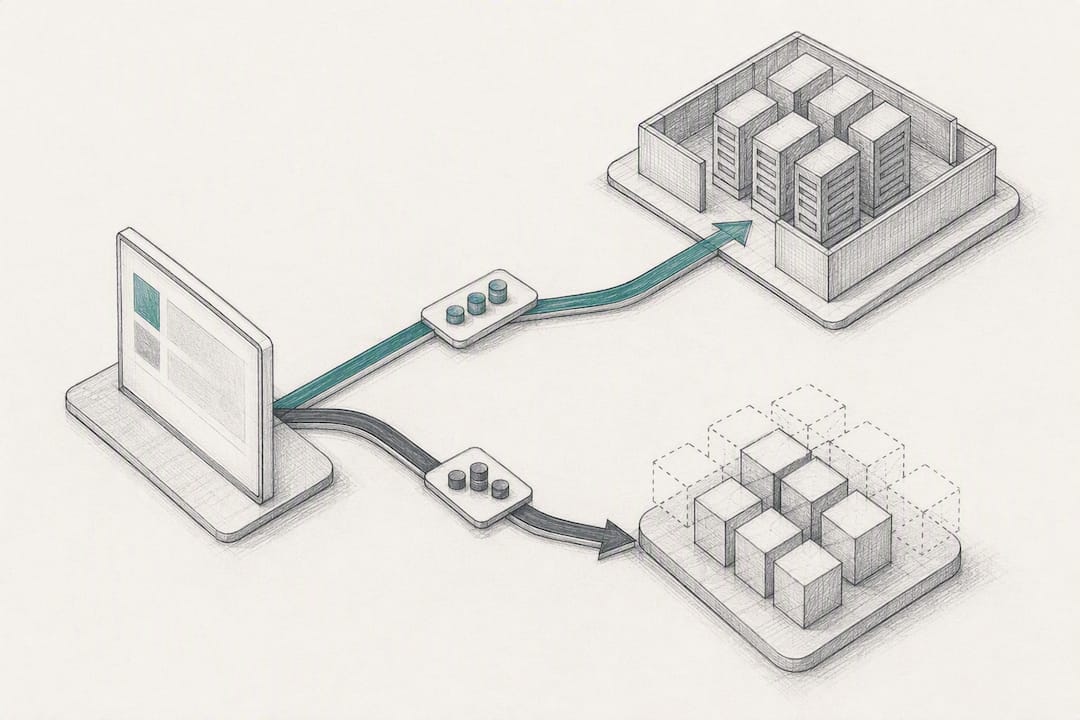
The OpenAI-compatible endpoint pattern discussed earlier is what makes this split painless rather than a re-architecture. Your application talks to one interface; which backend actually answers can change based on load, cost, or a manual cutover, without your integration code knowing the difference.
A pragmatic pilot checklist before you flip real user traffic onto on-prem infrastructure: load-test against realistic concurrent sessions, not single-user demos. Right-size hardware using the VRAM math above, with headroom for growth. Confirm the gateway is live and logging before the first real query. Validate your monitoring dashboard actually alerts correctly under a simulated failure, not just under normal operation.
How MedScrub Handles PHI On-Device in Practice
Healthcare presents the sharpest version of the on-prem case, because PHI can’t casually leave your environment, and every workaround adds legal risk. Medscrub’s approach anonymizes patient data locally, on the clinician’s own machine, before any AI model, local or cloud-based, ever sees it. The de-identification happens on-device; PHI never transits to an external server for processing.
That architecture puts Medscrub’s design squarely inside the best practices this guide covers: a gateway-equivalent layer enforcing what data can reach a model, local processing that respects a no-egress posture for sensitive fields, and a workflow built to operate on the clinician’s own infrastructure rather than assume a cloud connection. The eSpiral case study documents this in a live clinical setting, chart preparation and documentation running with PHI kept out of the cloud entirely.
For clinicians, the practical result is fewer hours lost to chart review and follow-up tracking. For IT teams evaluating the architecture, it’s a working example of gateway-first, privacy-by-design deployment applied to one of the highest-stakes data categories there is.
What a Sensible First Pilot Looks Like
Start with an internal knowledge assistant or chart-summarization tool, low-risk, high-frequency, and easy to measure. Track p95 latency, tokens processed per day, and whether audit logs actually capture what compliance needs. Real adoption, not raw output volume, is the metric that tells you if it’s working.
The biggest pilot risks are undersized VRAM headroom and a gateway bolted on after launch instead of before. Both are avoidable if you size hardware conservatively and treat the gateway as the true starting point, not a follow-up task. Get those two right and most other problems in an on-prem deployment are recoverable.
— Clint
See How Medscrub Fits Your On-Prem Strategy
Medscrub gives clinicians the documentation and follow-up automation this guide describes, without adding a new data-egress risk to your compliance posture. Patient data gets anonymized on-device before any model touches it, and the tool syncs directly with Epic, Oracle Health, athenahealth, and eClinicalWorks, so it slots into infrastructure your team already runs rather than asking you to rebuild around it.
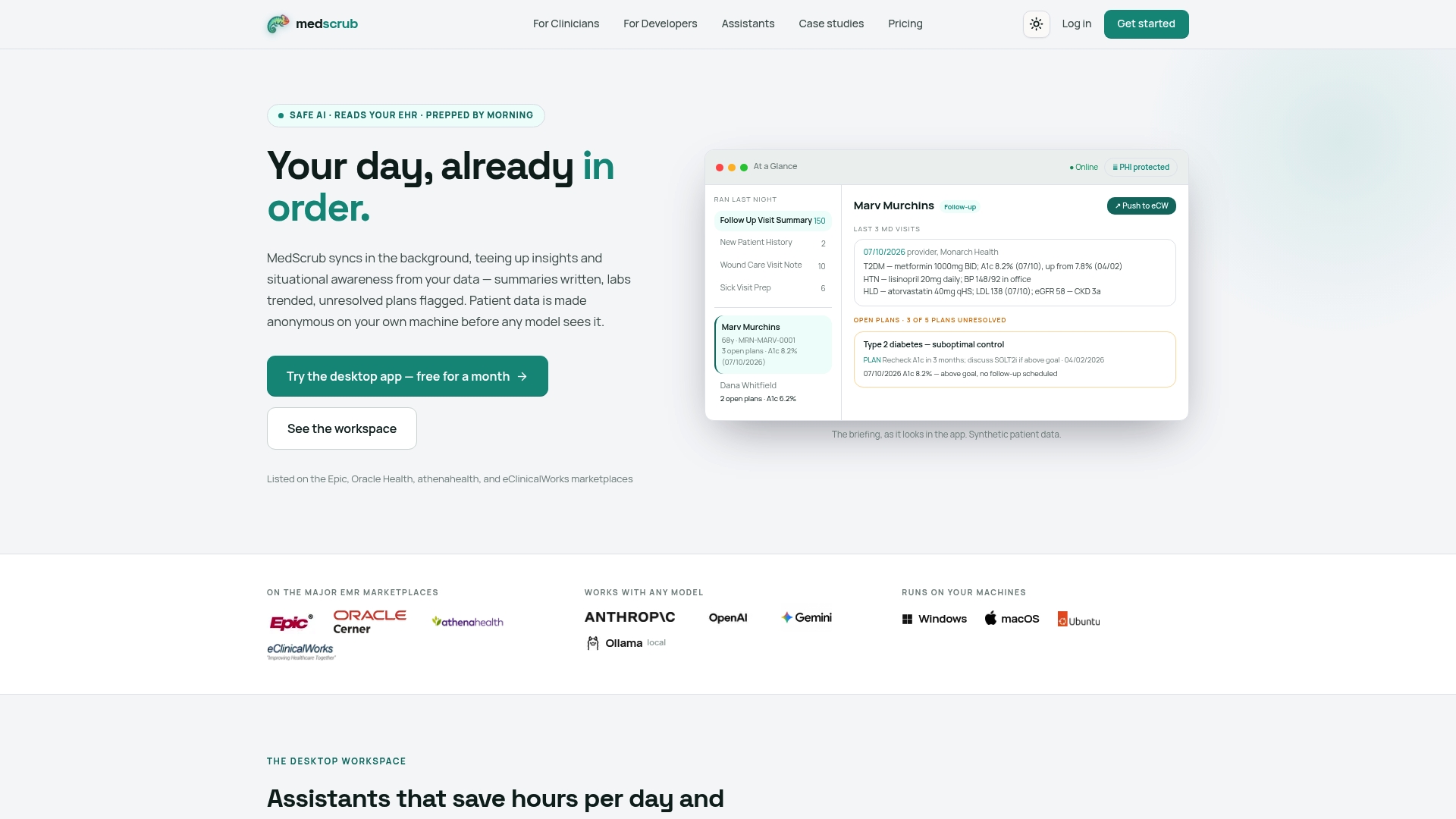
If you’re evaluating this for a clinical team, the Practice plan runs $89 per month per seat, or $99 per month on the Solo plan for individual clinicians; Enterprise pricing is available on request for larger deployments. Developers building on top of the platform can review the PHI proxy and API documentation to see how the de-identification layer integrates with existing systems. Clinicians curious about the day-to-day workflow impact should look at the clinician-facing overview, which walks through how the assistant handles chart prep before a patient walks in the door. Start with a trial and see where the two hours a day actually come from.
Sources
For deeper technical detail beyond this guide, the Modular on-prem LLM handbook covers architecture fundamentals, the PromptQuorum runtime comparison breaks down vLLM, TGI, and NIM in detail, and the arXiv cost-benefit paper offers the fullest academic treatment of the CapEx/OpEx break-even question.
- On-prem LLMs — Modular handbook
- Enterprise LLM inference servers (vLLM, TGI, NIM) — PromptQuorum
- A Cost-Benefit Analysis of On-Premise Large Language Model Deployment — arXiv (2025)
- On-Premise LLM deployment — LLM Configurator
FAQ
Can I Deploy an On-Premise LLM Server Myself?
Yes, with standard IT and ML infrastructure skills, though production-grade deployment involves more than installing a runtime. You need right-sized GPU hardware, a gateway for auth and audit logging deployed before launch, and a monitoring stack, and background estimates suggest a properly right-sized deployment can go from hardware to production in roughly an engineer-week once sizing and licensing are settled.
What Is On-Prem LLM Deployment?
On-prem LLM deployment runs a large language model on infrastructure your organization owns or controls directly, rather than through a cloud vendor’s hosted API. It keeps data inside your network perimeter and typically delivers latency under 50 milliseconds, compared to the 50 to 500 millisecond range common with cloud APIs.
What Does “On-Premises Deployment” Mean in This Context?
It means the inference runtime, the model weights, and the serving infrastructure all run on hardware physically or logically inside your organization’s control, whether that’s a single workstation, a co-located server, or a fully air-gapped rack. No inference request or response leaves that environment during processing.
How Can I Deploy an LLM Locally on My Own Hardware?
Pick a model sized to your available VRAM using the weights-plus-KV-cache-plus-overhead formula, install a runtime like Ollama for a quick start or vLLM for higher concurrency, and put an authentication and audit-logging gateway in front of it before opening it to real users. Tools like Medscrub demonstrate this pattern in a healthcare-specific context, running de-identification and inference locally so PHI never leaves the clinician’s machine.
Do I Need a GPU for On-Prem LLM Deployment?
For any use case with more than a couple of concurrent users or a real latency expectation, yes. CPU inference works for low-throughput, latency-tolerant tasks like overnight batch jobs, but it can’t reliably serve simultaneous interactive users the way even a modest consumer GPU can.


