Keep PHI Local: Four Rs for Prompt Engineering in Clinical Practice
· 11 min read

Keep PHI Local: Four Rs for Prompt Engineering in Clinical Practice
Prompt engineering in healthcare means writing precise, structured instructions that get large language models to produce clinically usable output instead of generic text. Done right, it turns a chatbot into a documentation assistant that drafts accurate notes, flags care gaps, and summarizes labs in seconds. The FDA’s March 2026 guidance on clinical decision support and frameworks like the Four Rs give clinicians a safety net; tools like Medscrub give them the infrastructure to use it without exposing patient data.
TL;DR:
- Prompt engineering techniques like zero-shot, few-shot, and chain-of-thought improve the reliability of clinical outputs, but verification remains essential due to hallucination risks.
- Clinicians should prioritize low-risk documentation tasks first, such as discharge summaries, and measure time savings and accuracy before expanding to diagnostic support.
- On-device anonymization and structured prompt templates enabled by platforms like Medscrub mitigate PHI risks while improving workflow efficiency and compliance.
- Regulatory guidance emphasizes explainability, citing the need for clinicians to review and verify AI outputs, especially in decision support applications.
- Iterative logging of prompt variations helps build effective templates, and local validation is necessary when models are trained on non-representative data to avoid bias.
Table of Contents
- What Prompt Engineering Means in Clinical Settings
- Core Techniques and Prompt Patterns Clinicians Should Know
- Clinical Applications and Concrete Use Cases
- Safety, Bias, Validation, and Regulatory Context
- A Four Rs Framework You Can Trial This Week
- Real-World Examples Worth Studying
- What Clinical Teams Should Prioritize First
- Medscrub: Operationalizing Prompt Engineering Without the PHI Risk
- Sources
- FAQ
What Prompt Engineering Means in Clinical Settings
Generic prompting asks a model to write an email or summarize a news article. Clinical prompt engineering asks it to reason inside a domain where a vague instruction can produce a plausible but wrong differential diagnosis, a hallucinated drug interaction, or a discharge summary that misses a critical follow-up. The stakes change the discipline.
Most clinicians turn to prompting for four recurring jobs: drafting notes and summaries, generating structured clinical decision support output, translating clinical language into something a patient can actually understand, and speeding up research or literature review. Each job comes with its own constraints.
- No protected health information belongs in a prompt unless the environment is PHI-compliant end to end.
- Every model has knowledge cutoffs and can misstate guideline details, so outputs need a verification step.
- A clinician, not the model, remains the final decision-maker on anything that touches patient care.
Prompt design for medical AI works only when those constraints are baked into the instruction itself, not bolted on afterward.
Core Techniques and Prompt Patterns Clinicians Should Know
A recent ScienceDirect review categorizes healthcare prompting techniques from simple manual instructions to more automated, iterative methods. For clinical use, five patterns cover most of what you will need.
- Zero-shot prompting. Ask directly with no examples: “Summarize this progress note into three bullet points for the attending.” Works for straightforward, low-ambiguity tasks.
- Few-shot prompting. Show the model two or three examples of the output format you want before asking it to do the fourth. This matters most when you need a consistent structure, like SOAP notes formatted a specific way for your EHR template.
- Chain-of-thought prompting. Instruct the model to reason step by step before giving a final answer. This slows the output down but makes the logic auditable, which matters when the output feeds a differential diagnosis list.
- Meta-cognitive prompting. Ask the model to state its confidence level and flag where it’s uncertain. Comparative research on LLM safety in clinical settings found this approach improves transparency and gives clinicians something concrete to audit, even though it doesn’t eliminate errors.
- Prompt chaining. Break a multi-step task, like chart prep followed by summary followed by follow-up action items, into separate linked prompts rather than one giant instruction. Each step is easier to check.
Role-based framing helps across all five: telling the model “You are an evidence-based clinical assistant that cites uncertainty and never fabricates references” changes its output tone measurably.
Pro Tip: Model temperature settings and prompt design do different jobs. A low temperature setting reduces creative drift, but it won’t stop a badly framed prompt from producing an unsafe answer. Fix the prompt first, then tune the parameters.
Clinical Applications and Concrete Use Cases
Documentation automation is where most practices start, because the return on time is immediate and the risk is manageable with review. A well-built prompt template for discharge summaries or SOAP notes, fed structured chart data, can turn a fifteen-minute drafting task into a ninety-second review.
Clinical decision support is higher stakes and needs tighter guardrails. A structured differential prompt should force the model to list its reasoning, cite the clinical basis for each item, and explicitly state what still needs human confirmation. Never treat a CDS-style output as a finished recommendation.
Patient communication is a strong, lower-risk use case. Plain-language summary prompts and teach-back style explanations (asking the model to explain a diagnosis at an eighth-grade reading level, then generate a check-in question) genuinely improve patient understanding without touching diagnostic judgment.
Practice operations round out the list:
- Drafting prior authorization and appeal letters from structured case notes.
- Synthesizing literature for a specific clinical question before a deeper manual review.
- Assisting with coding suggestions that a biller still verifies against payer rules.
Documentation and administrative tasks tolerate pilot-stage use. Anything feeding a diagnostic or treatment decision needs a validation process closer to what you’d apply to a new clinical protocol, not a new software feature.
Safety, Bias, Validation, and Regulatory Context
The safety data is honest, and it should make you cautious rather than confident. A comparative analysis of prompt engineering strategies across LLMs found that safety incidents concentrate in complex ethical scenarios, the kind involving competing patient interests or ambiguous consent. Meta-cognitive and safety-first prompting improved some outcomes but did not eliminate the underlying safety gaps.
Prompting strategies that ask a model to reason transparently or flag uncertainty measurably reduce some categories of error, but no prompt pattern tested closes the safety gap in ethically complex clinical scenarios. Human review stays mandatory, not optional.
Hallucination rates vary widely by task and model, with some analyses citing a range as broad as 3 to 27 percent depending on what you’re asking the model to do. Treat every clinical output as a draft, never a final answer.
The FDA’s final clinical decision support guidance, published in March 2026, clarifies that CDS software can avoid device regulation under 21st Century Cures Act criteria if it lets clinicians independently review the basis for a recommendation and doesn’t replace professional judgment. That has direct implications for prompt-driven tools: build in explainability, cite the reasoning basis, and never present output as a final call.
WHO’s guidance on large multi-modal models in health adds another layer: models trained mostly on one population’s data can carry contextual bias into a different setting. Local validation before deployment isn’t a formality; it’s how you catch that gap before a patient does.

A Four Rs Framework You Can Trial This Week
The Four Rs framework from Annals of Family Medicine gives clinicians a repeatable structure: define the Role you want the model to play, give it clear Request language, supply relevant Result format expectations, and build in Revision steps for iteration. Apply it and most vague prompts fix themselves.
- Chart summarization template. “You are a clinical summarization assistant. Using only the structured data provided, generate a three-section summary: active problems, recent labs with trend direction, and pending follow-ups. Flag anything with missing data instead of guessing.” Never place real PHI in a test prompt.
- Structured differential template. “List the three most likely diagnoses given these findings, state the clinical reasoning for each, and list what additional data would change your ranking. Do not present this as a final diagnosis.”
- Patient-facing explanation template. “Explain this diagnosis in plain language at an eighth-grade reading level, then generate one teach-back question to check understanding.”
Test each template against a sample set of anonymized cases, have a second clinician review the outputs, and log every prompt version alongside its results.
Pro Tip: Keep a running log of which prompt phrasing produced the cleanest output for each task type. Six months in, that log becomes your practice’s own prompt library, better than any generic template.
Real-World Examples Worth Studying
Prompt-driven chart prep isn’t theoretical. Medscrub’s eSpiral case study shows AI assistants working directly inside the chart while PHI never leaves the clinician’s machine, and the Monarch Health deployment demonstrates nightly chart preparation running against open treatment plans without a cloud handoff.
What makes both examples relevant to prompt design specifically:
- On-device anonymization lets prompts reference rich chart context without ever sending identifiable data to a model vendor.
- EMR sync across systems like Epic and Oracle Health means prompt templates can pull structured, current data instead of copy-pasted fragments.
- Custom assistant builders let a practice encode its own Four Rs style templates once and reuse them across every chart.
What Clinical Teams Should Prioritize First
If you’re piloting prompt engineering in a practice, sequence matters more than sophistication. Pick one low-risk, high-frequency task first, documentation is the obvious start, and measure time saved and error rate before touching anything diagnostic.
Document every prompt version you deploy. Keep a clinician in the review loop permanently, not just during the pilot. And measure outcomes that matter to patients, not just to your workflow, follow-up completion, note accuracy, response time, before calling anything validated.
— Clint
Medscrub: Operationalizing Prompt Engineering Without the PHI Risk
The templates and frameworks above only work safely if the infrastructure underneath them keeps patient data off third-party servers, and that’s the specific gap Medscrub was built to close. It syncs directly with Epic, Oracle Health, athenahealth, and eClinicalWorks, anonymizes PHI on your own device before any prompt reaches a model, and lets you build assistants in plain English using the same Four Rs style structure covered here, no BAA required for model vendors, no PHI ever leaving your machine.
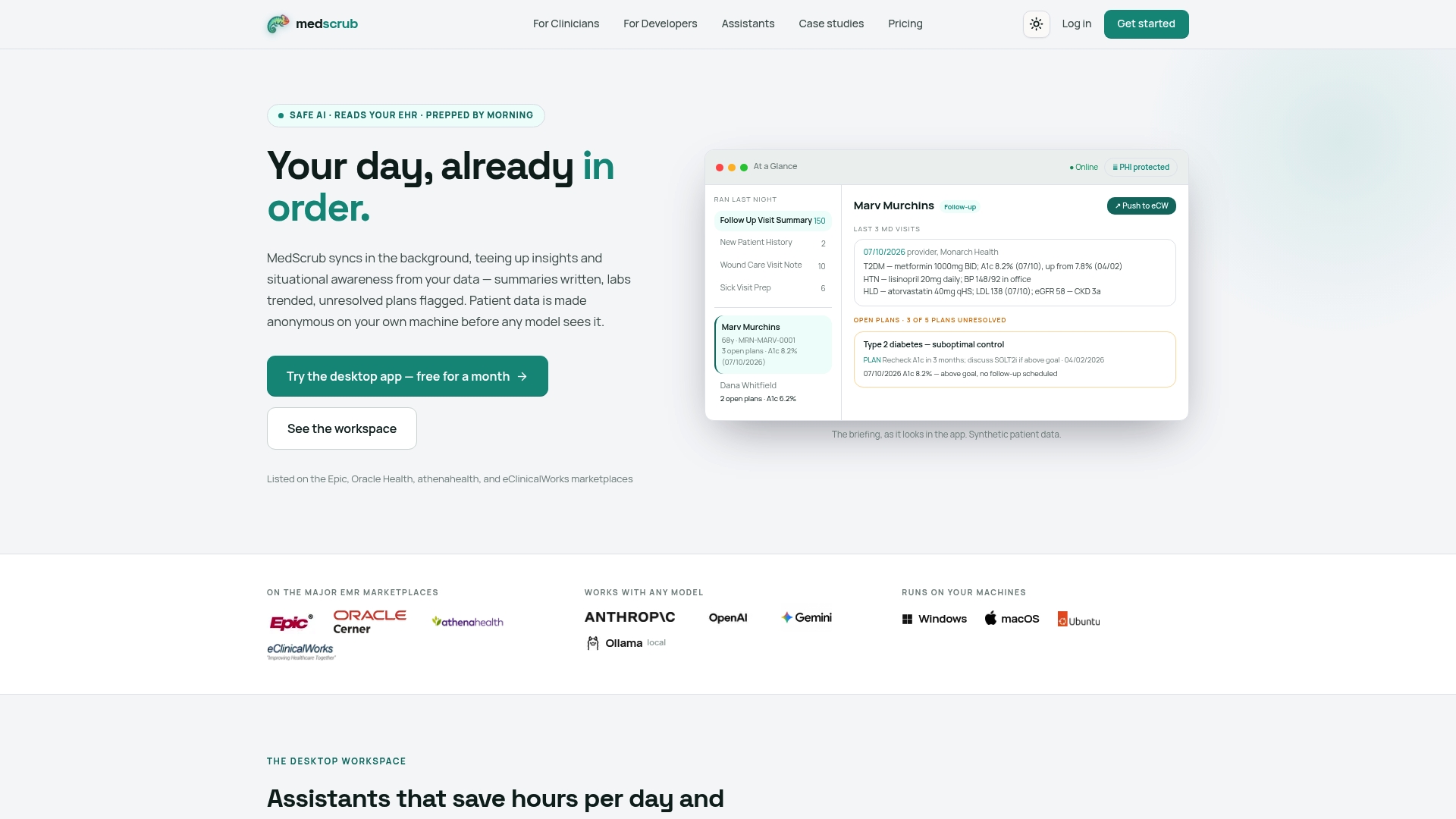
Clinicians report saving significant daily time on chart prep and follow-up tracking, freeing up more time for patient care instead of documentation. The Solo plan runs $99 per month for individual clinicians, and the Practice plan runs $89 per seat per month for group deployments. If you want to see how this looks in an actual practice before committing, review the full case study library or start with the clinician-facing product overview to check fit for your workflow.
This article is general information, not a substitute for advice from a qualified doctor. Consult a qualified healthcare professional about your own circumstances before acting on anything here.
Sources
- Ethical implications of using general-purpose LLMs in clinical settings: a comparative analysis of prompt engineering strategies and their impact on patient safety - PMC
- Town hall: clinical decision support software final guidance - FDA
- Ethics and governance of artificial intelligence for health: Guidance on large multi-modal models - WHO
- A practical framework for writing medical LLM prompts in family medicine | Annals of Family Medicine
- Prompt engineering for healthcare: Methodologies and applications - Meta-Radiology (ScienceDirect)
FAQ
Which Healthcare Jobs Will Survive AI?
Roles built on clinical judgment, direct patient relationships, and physical exams are the most resistant to automation. AI reshapes documentation and administrative work first, which is exactly why prompt engineering skills matter now: they let clinicians direct the automation instead of being displaced by it.
Is Prompt Engineering Still in Demand?
Yes, and in healthcare specifically it’s growing as more clinics adopt LLM-based tools for documentation and decision support. The skill has shifted from novelty to practical necessity, especially as regulatory guidance starts expecting explainable, auditable AI outputs.
Which AI Tool Is Best for Healthcare?
The right tool depends on whether you need chart-aware automation with strict PHI protection or a general-purpose assistant for non-clinical tasks. Medscrub is built specifically for clinical workflows, syncing with major EMRs while anonymizing PHI on-device before any prompt reaches a model.
Did Bill Gates Say AI Will Replace Doctors?
Bill Gates has talked publicly about AI reducing shortages of doctors and teachers in areas with limited access to care, not about AI replacing clinical judgment outright. The consensus among health authorities, including the WHO, is that AI supports clinicians rather than substitutes for them.
What Does Medscrub Cost?
Medscrub offers a Solo plan at $99 per month and a Practice plan at $89 per seat per month, both listed on the pricing page. Enterprise and Hobby tiers are also available, with pricing available on request.


